Today, protecting against personal data leaks
takes a system even the operator can't see into.
ENsemble holds one copy of your departments, positions, memberships and members, in a place kept separate for each organization, and hands them to your organization's services such as enMail. The directory and the mail are sealed with your organization's key, so not even Entamy, the operator, can read them.
The sign-up screens are in Japanese for now.
Why ENsemble
So that your organization's structure isn't kept separately in every service.
Enter it once
When people and departments are entered again in each service, the copies drift apart. ENsemble keeps the single source of truth, and each service receives it from there.
Remove leavers everywhere at once
Accounts left behind in services are a common cause of leaks. Remove someone in ENsemble, and they are removed from every service your organization uses.
Unreadable even to the operator
Each organization has its own separate place, and its contents are sealed with the organization's key. Even if one place is breached, other organizations are not reached.
Only verified organizations
ENsemble can be started only by the authorized person of an organization whose legal existence and representative have been verified. That person becomes the organization's super administrator.
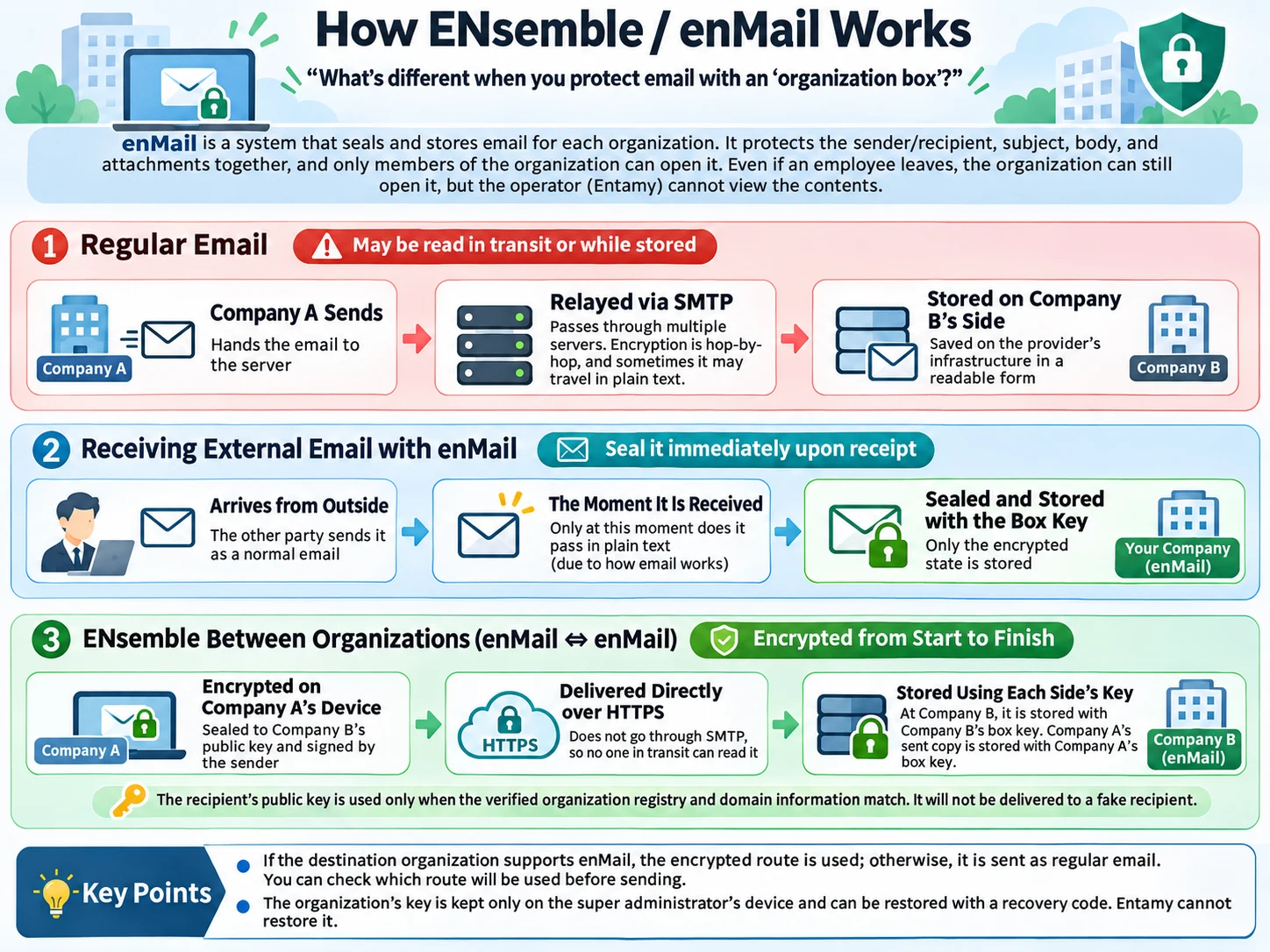
Mail contents, sealed per organization — the enMail example
Services that work with ENsemble
The "en" at the start of a name marks an ENsemble service. Services starting with "en" are standard features of ENsemble: you can contract them one by one, or together in the basic pack for less. Every one of them signs in with your ENsemble membership and receives people and departments from ENsemble. Remove someone in ENsemble, and they are removed from all of them.
enMail
Your organization's mail. Contents are sealed and stored with a key per mailbox, and mail between ENsemble organizations is encrypted from device to device.
enCMS
Manage your organization's website. Who edits and who approves is decided from memberships and positions in ENsemble.
enNote
The ENsemble edition of KuroNote. Note keys are held in ENsemble and divided by your organization's hierarchy (departments and groups), so only the people in that unit can open them.
enViewer
The ENsemble edition of KuroViewer. Lets people with the right to do so view your organization's documents (in preparation).
A workspace that doesn't hold your contents
How it differs from the usual workspace design.
| Typical workspace | Entamy ENsemble | |
|---|---|---|
| Organization identity | Verifies domain ownership | Verifies the legal entity and its representative |
| People, departments, managers | Held together for all organizations on the provider's infrastructure | Held separately per organization; names and the like sealed with the organization's key |
| Mail contents | Stored in a form the provider can read | Sealed with the mailbox key; device-to-device encryption between organizations |
| Member accounts | Accounts with the provider | An identity that exists only inside the organization (passkeys) |
| Connecting services | SSO and SCIM | An IdP inside the organization (OIDC); the structure is delivered signed by the organization |
| Recovery after loss | The provider can restore it | Restored by the super administrator and the organization's recovery code (the provider cannot) |
Pricing
ENsemble itself is free. Services can be contracted one by one, and services starting with "en" cost less together in the basic pack. Contracts are made from your organization's admin screen.
ENsemble
Organization directory, inviting and certifying members, sign-in inside the organization, and delivery to services.
Basic pack
The services starting with "en" (enMail, enCMS, enNote, enViewer) together, for less. Pricing is in preparation.
Individual contracts
Services starting with "en" can also be contracted one by one. Services without "en", such as MushManager, are contracted individually. All of them receive people and departments from ENsemble.
harmo
The basic service is free; you contract only some paid features. Payment is made in the ENsemble admin screen, just like the other services.
How to start
ENsemble is started by your organization's authorized person.
Register your organization
On the start screen, register your organization as a corporation or an individual, and become its authorized person.
Choose a label and set it up
Choose the label that begins your address. Your organization's screens will be at https://{label}.en-semble.org/.
Create the organization key and invite members
Create your organization's key in the admin screen, write down the recovery code, then invite members.
About the name
- EN = 縁 (en) — The leading EN is read "en", the Japanese word for the ties and encounters between people.
- ensemble — "Together; a group performing in harmony." The people of an organization, each in their own role, coming together as one.
- EN = Entamy — Entamy's initials, marking it as an Entamy product.
Frequently asked questions
Is ENsemble really free?
Yes. The organization directory, inviting and certifying members, sign-in inside the organization and delivery to services are free. You pay only for the services you contract.
Who can start?
Your organization's authorized person. First register your organization and become its authorized person, then set ENsemble up.
Can Entamy read our organization's contents?
No. Members' names and the like are stored sealed with the organization's key, and that key exists only on the super administrator's device. Entamy can see only what operation needs, such as meaningless IDs, counts and dates.
What if we lose the organization key?
It can be restored by recovering the super administrator's account, or with the organization's recovery code. If both are lost, no one can restore it. Entamy cannot restore it either, so be sure to write the recovery code down.
What happens when someone leaves?
Remove them in ENsemble, and from that moment they can no longer get into any of your organization's services. What belongs to the organization, such as mail at the organization's domain, stays with the organization.
How many ENsembles can one organization have?
One, so that the organization's structure has a single source of truth. If you want to separate, for example, a subsidiary, register it as a separate organization.
Start your organization's ENsemble
It's free to start.